Von Neumann Architecture
The Von Neumann architecture is a model of computer design with four main parts: Memory, CPU, Input devices, and Output devices. Proposed by John von Neumann in the 1940s.
Components
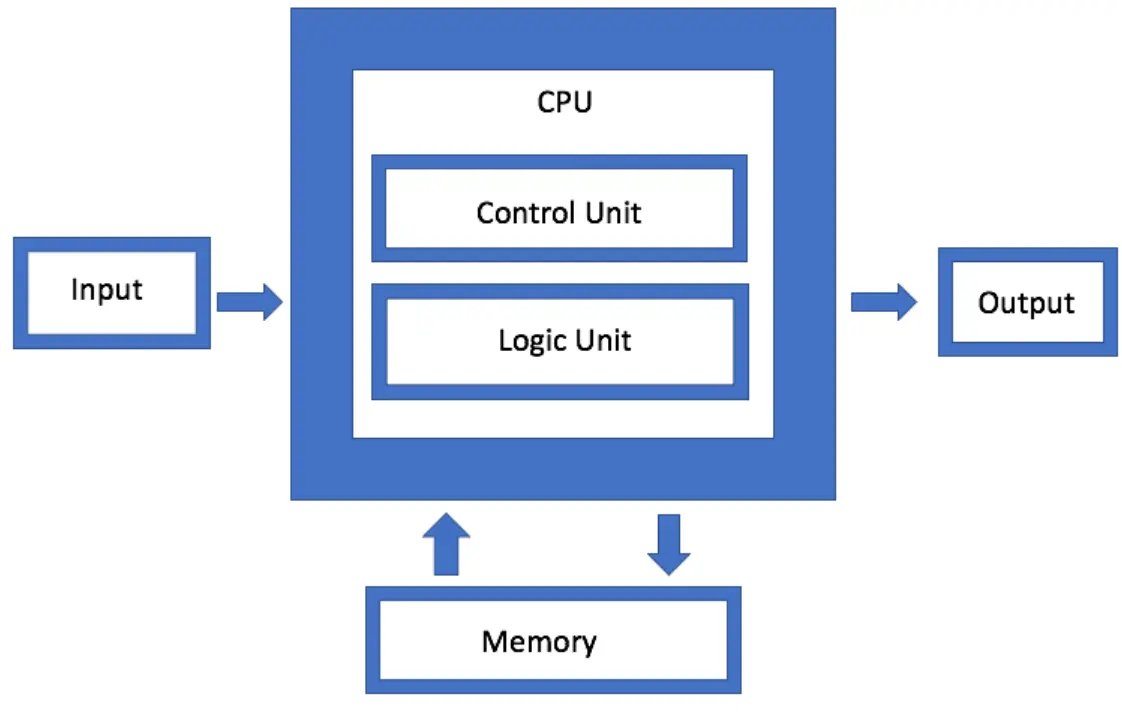
- Memory: Stores both data and program instructions for the CPU. It allows quick access to information needed for processing.
Types: RAM (temporary, fast) and ROM (permanent, slower).
Example: RAM stores a program for faster execution than a hard disk.
- CPU: Executes instructions from memory and performs calculations.
Subcomponents:- Arithmetic Logic Unit (ALU):It handles calculations such as addition, subtraction, multiplication, and division, as well as logical comparisons like AND, OR, and greater than/less than. Example: Calculating 2 + 2 = 4
- Control Unit (CU): Manages CPU operations and directs ALU and memory. Example: CU supervises ALU steps
- Input Devices: Allow users to enter data and instructions into the computer.
- Output Devices: Display or produce the results of processed data.
-
System Bus: The main communication pathway that connects the CPU, memory, and input/output devices, allowing them to exchange information.
- Data Bus: Transfers actual data between CPU, memory, and devices.
- Address Bus: Carries the memory addresses that specify where data should be read from or written to.
- Control Bus: Sends control signals (like read/write commands) to coordinate all operations.
Examples: Keyboard, mouse, microphone, scanner
Examples: Monitor, printer, speakers
CPU Working (Fetch, Decode, Execute, Store)
- Fetching: The CPU retrieves (fetches) the next instruction from memory. The Program Counter (PC) holds the address of the next instruction, and this instruction is loaded into the Instruction Register (IR) for processing. Example:
- PC points to the instruction: “Add 5 + 3”
- CPU fetches it and stores it in IR
- Decoding: The Control Unit (CU) interprets the fetched instruction and determines what action is required. It identifies the type of operation and prepares the necessary components (like ALU). Example:
- CU reads “Add 5 + 3”
- It understands that this is an addition operation and selects the ALU for processing
- Execution: The ALU performs the actual operation, while the CU manages the flow of data between components. Example:
- ALU performs: 5 + 3 = 8
- Result is produced after calculation.
- Storing (Write-back): The result of the operation is stored back in memory or sent to an output device for display. Example:
- Result (8) is stored in memory.
- It can also be displayed on the monitor or used in another calculation.
- Fetch → Instruction loaded
- Decode → CU identifies multiplication
- Execute → ALU calculates (4 × 2 = 8)
- Store → Result saved or displayed
Characteristics & Advantages/Disadvantages
- Single Memory Store: Both data and instructions are stored together in the same memory.
-
Example:In a game 🎮, the game code and player score are stored in the same RAM.
- Sequential Execution: Instructions are executed one after another, in a fixed order.
- Stored Program Concept: Programs are stored in memory so they can be modified, updated, or replaced.
- Advantages:
Simplified design: By combining instructions and data into a single memory area, architecture is simplified. - Flexibility: Programs can be easily changed by changing the contents of memory.
- Disadvantages:
Von Neumann bottleneck: The CPU uses one memory path for both instructions and data, so it can only get one at a time, which slows down processing. - security risk: As data and instructions are stored in same memory[Ram], one instruction can change or mess with other instructions, making the system unsafe.
Example: When a program runs, it follows steps step-by-step.
Example:When you update an app 📱, new instructions replace old ones.
Example:When you update an app 📱, the new instructions replace the old ones in memory.
Computing Systems
A computing system is a structured set of hardware and software designed to process data and perform tasks. Objectives: Solve problems, control processes, manage data, aid communication.
Hardware: Physical parts that you can see and touch 💻.
Examples:- CPU (brain of computer)
- RAM (temporary memory)
- Keyboard, mouse, monitor
Software: Software is a part of a computer that we can see but cannot touch. It consists of programs that tell the computer what to do. It is also called program or computer program.
Example:You can see an app or program on the screen. But you cannot touch it physically like a keyboard.
Types:There are 2 Types of software:
- System Software: System software manages the hardware and controls the working of digital devices like computers, mobiles, laptops, iPads, and smart watches, etc. 👉 Examples: Windows, Linux
- Application Software: Application software is used by users to perform specific tasks. Examples:
- Microsoft Word → used to type and edit documents 📝
- Web browser → used to search and browse the internet 🌐
- Games → used for entertainment 🎮
Internet as a System
The Internet is a network of networks.
Examples:- Home network
- School network
- Office network
All connected together = Internet 🌍
Internet Protocols
- TCP/IP (Transmission Control Protocol / Internet Protocol): TCP/IP is a set of rules where TCP handles the transfer of data between devices, and IP provides addresses to devices so they can connect and communicate with each other.
- UDP (User Datagram Protocol): Sends data quickly without checking for errors, often used for live streaming and online games where speed matters more than accuracy.
- FTP (File Transfer Protocol): Used to transfer files between computers over a network, such as uploading or downloading files from a web server.
- POP (Post Office Protocol): Used by email clients to retrieve messages from a mail server and download them to a local device.
Multiple Choice Questions (MCQs)
Test Yourself: Interactive MCQs (Von Neumann Architecture & Computing Systems)
FAQs
It is a computer design model where data and instructions are stored in the same memory, and processing is done by the CPU.
The main components are Memory, CPU, Input devices, Output devices, and System Bus.
The CPU executes instructions, performs calculations, and controls all operations of the computer.
The ALU performs arithmetic operations (like addition, subtraction) and logical operations (like AND, OR).
The Control Unit manages and coordinates all CPU activities and directs data flow inside the computer.
It is the process where the CPU fetches an instruction, decodes it, executes it, and stores the result.
It is a limitation where CPU cannot access data and instructions at the same time due to a shared memory path.
A computing system is a combination of hardware and software used to process data and perform tasks.
Hardware is physical components like CPU and keyboard, while software is programs that control the computer.
The Internet is a global network of interconnected networks like home, school, and office networks.
TCP/IP is a set of rules where TCP handles data transfer and IP provides addressing for devices.
UDP is used for fast communication like online gaming and live streaming where speed is more important than accuracy.
FTP is a protocol used to transfer files between computers over a network.
POP is used to download emails from a mail server to a local device.